Traffic Map Series - 2-Weeks After Your Post Goes Live
Now that your epic blog post has been around for 2-weeks, it’s time to start promoting it again.
Are you starting to see how all this works to help your post get to more people and build your newsletter or page views? Good.
In the previous post (Read it here), I mentioned that Buzz Sumo analyzed over 100 million articles and found that shares dropped 96% after the first 4 days.
But, shares increased when the article is shared multiple times over the next month. (Evernote’s Infographic)
This my dear reader is the reason behind this Traffic Map Madness!
10 Things You Can Do To Promote Your Blog 2-Weeks After It Goes LIVE
My Traffic Map 2016: Post 1- Preparation . Post 2 - Before You Hit Publish . Post 3 - Share on Twitter . Post 4 - Share on Pinterest . Post 5 - Share on Facebook . Post 6 - One Day After . Post 7 - 1-Week After . Post 8 - 2-Weeks After Post 9 - 1-Month After.
This post is part of the 30-day Blog challenge hosted by Lesa Townsend.
Invite your friends to the Epic Blog Post Traffic Map Party!
I'm reading Sara's Epic Blog Post Traffic Map. Join Me #amreading Click To Tweet
1. Share your post on Social Media
You want to use different copy (or the same depending on how well your previous posts did). It’s a good time to check your analytics (URL tracking code) to see where your post has been shared and how many times.
- Google+
- StumbleUpon
- Scoop.it
2. Schedule Quotables (and/or Tips) for Twitter
Grab some Quotables and/or tips from your post and schedule them throughout the next month on Twitter. You can create quotable images from the copy that did well in the first 2-weeks of promotion. (quotable images)
TWEET: Schedule Quotables and/or tips from your blog post throughout the next month #blogtip Click To Tweet
Example: (for this post I would schedule the following tweets)
- A simple way to reshare your blog post
- Have you considered SlideShare in your blog promotion strategy?
- Buzzword - Content Upgrade. Are you using it?
3. Publish your presentation on SlideShare
Include a keyword rich description and don’t forget to add the link to your post. Share it on Linkedin too.
Tip: if you purchase the SlideShare subscription you can collect leads directly from your presentation.
Read this post by Donna Moritz of Socially Sorted as she shares how she used Slideshare to get 450K (thousand) views. ^_^
WATCH this slide presentation I did a few years ago as a guest author on a crochet blog. I’m no Donna, but it did receive almost 3,000 views. The key? The blog I was a guest on is a popular blog which receives lots of traffic from a very engaged community.
4. Record and Publish your audio for Audioboom
Grab your script and practice it a few times then start recording it. Once it is done, publish it to Audiboom and share to social media.
Tip: Add the audio link to your post
Here’s a series I made a few years ago when I was a crochet blogger. It is the audio version of what soon became my first eBook. LISTEN IN.
5. Post your presentation as a slide show with music or a voice over on Youtube and Vimeo
Add a detailed, keyword rich description along with the link to your post.
Here’s a presentation I did a few months ago to help small business owners itemize what they do in their business so they can start outsourcing their first project. WATCH NOW.
6. Create a checklist or Quick Summary (cheat sheet) PDF to giveaway
Example: Speed Racer Blog Traffic Checklist Opt-in
Tip: Grab the URL for your name (or blog) with the .news extension. It is an easy way to remember your opt-in addresses plus, it’s a lot easier to track. (http://traffic.saraduggan.news)
7. Comment on more blogs
Revisit the blogs you’ve commented on to reply to any responses. Comment on new blogs where your target audience is asking the questions that your blog post covers.
8. Comment on FB pages as your page
In the first post in this series, (read it here) you set up your social media accounts with a link to your lead magnet. This traffic map is WHY!
You want to revisit any pages you commented on plus visit some new pages. Remember to comment as “your page” and NOT your personal profile.
Remember, you’re not leaving links to your post rather you’re answering questions that your post answers OR adding to the conversation that is already taking place. People will naturally click through to your page if you are adding value to the conversation.
9. Write short posts and share these in groups where your audience is
Share NON-PROMO posts in groups. Here is an example of a one I did for my Before You Hit Publish post:
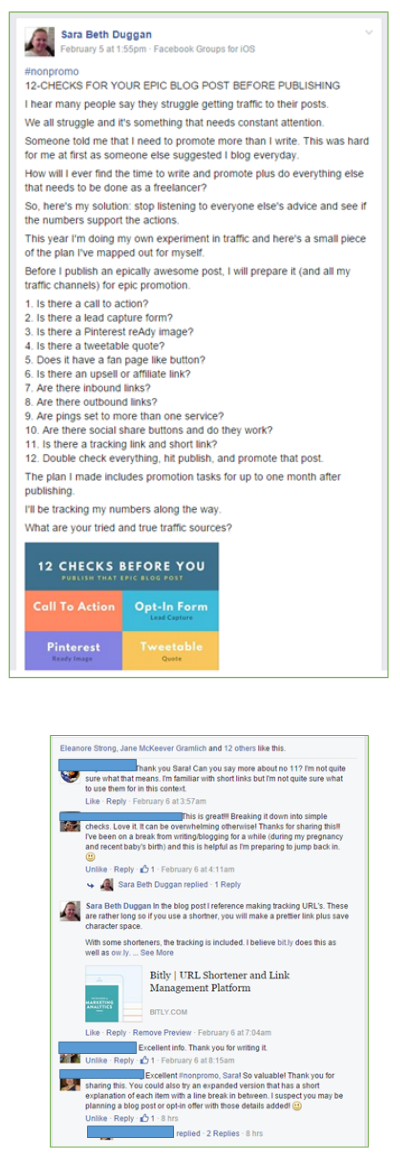
Notice that I pulled information from the Before You Hit Publish Post and shared the Pin-ready image. I didn’t include the link to the post, the post was able to stand on its own. It received 12-likes and a number of comments. I was even asked to explain step 11 further. THIS IS ENGAGEMENT! Exactly what I’m after.
10. Revisit Just Retweet to add another tweet and check your previous posts
This is one site I use to promote my posts. You can visit this post for more details. It’s optional, but it is a great way to get more Retweets. Review the stats on your previous Tweet and if necessary, add another tweet to the hopper.
TIP: http://justretweet.com is a free site to help fellow bloggers promote their posts.
Well, that’s all she wrote - as they say. I sure hope this series is helping you grow your mailing list and page views.
Please don’t be shy, leave a comment below, TWEET me a message, or Join me on Facebook (I promise to respond).
Be sure to download the Blog Traffic Checklist before you go AND I’m always grateful if you take the time to share this post with your friends.
Share on Pinterest | Share on Twitter | Share on Google+ | Share on Facebook | or Share on Linkedin
Leave a Reply