4 Ways to Share on Facebook
[without looking like a total sleeze]
Facebook Fan pages have seen a nosedive in traffic over the last few years. The ‘powers that be’ want to give the people what they want - less of what they don’t want to see and MORE of what they do. Smart business don’t you think?
Here’s an interesting Statistic From Syncapse.com: (screenshot)
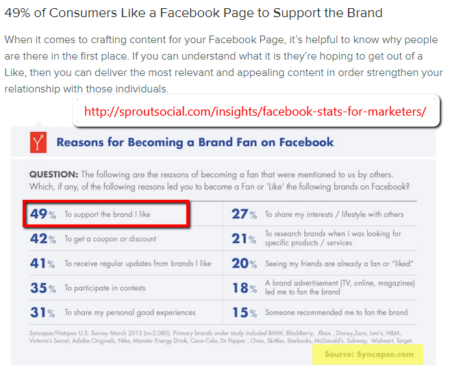
49% of people who LIKE Fan pages do so to SUPPORT the brand. That means there is absolutely no financial incentive at all. That also means that 40% don’t like brands at all. The rest, aren’t on Facebook.
49% of people who LIKE Fan pages do so to SUPPORT the brand. Source:Syncapse.com Click To TweetInstead of lamenting the old sly rules of the past (likes for likes) why not give genuine interaction and sharing a try? This isn’t to say that your page can’t be used to promote, but it is more about giving your fans the information they (and their friends) want.
Remember, you may use social media for business but the millions of other people in the virtual social planet do so to connect with friends, family, and new people. They get enough advertising in real life they want to veg out and dream in their off time.
Don’t have time to read the rest of the post? Save it to Facebook for Later:
My Traffic Map 2016: Post 1- Preparation | Post 2 - Before You Hit Publish | Post 3 - Share on Twitter | Post 4 - Share on Pinterest | Post 5 - Share on Facebook | Post 6 - One Day After | Post 7 - 1-Week After | Post 8 - 2-Weeks After | Post 9 - 1-Month After.
This post is part of the 30-day Blog challenge hosted by Lesa Townsend.
1. Share your post to your Fan Page
Before you share your post with your fans, take the time to create an image that grabs the attention of the viewer. Use this guide by BufferApp for the correct dimensions. Here are some apps I like to use:
- Typorama - you can find this in the iPhone App Store. It uses Pixabay as image feed or you can add your own image. Select the size of your image (Instagram, Facebook, Twitter) and double tap on the text to add your own quote or select ‘random quote’ to add one of theirs. To add your logo or URL to the images, pay the $2.99 fee or simply use the free version with their logo.
- Canva - a fantabulous (just made up a word) tool for all things visual, easy to use too. Just sign in, select Facebook post and get to creating.
- PicMonkey *affiliate link* - my favorite editor because it is just so easy to use. Use the image guide from buffer app to get the size of the post and design your image. Don’t forget to brand your image with your logo and/or URL.
- Fotojet - (new to me) it’s very similar to Canva, but with a bit of flair. You can create social media posts as well as cards, posters, and silly comics or faux magazine covers.
- Pablo - is an image app by (drum roll…) buffer app. 🙂 Use one of their images or upload one of your own. Again, you can create an image for most of the popular social networks including Facebook. Remember to save your image to your computer.
2. Share your post in a group you manage or a group that supports interacting and sharing posts
Take a snippet of your post and turn it into a group status. For instance, for this post I could share the following:
Hi [group members], here’s what I’ve been doing lately with my best blog posts. 1. share it on my fan page after making an image on Fotojet, 2. I share in some of my groups (like this one), 3. I create a note (again on my fan page) and add another popping image with a short summary of the post, and finally, 4. I interact with other pages. How do you promote your blog post to maximize its reach?
3. Write a Note with a featured image summarizing your post
The “Notes” feature on Facebook is pretty fancy now. You can add photos, quotes, lists, headings, and brackets. Makes for lovely ‘fans-only’ exclusive content. Add a couple of links to your other social platforms to encourage interaction and don’t forget to encourage sharing of the Note itself.
4. Interact with other pages in a genuine way (be sure you are signed in as your page and NOT your profile)
Finally, interact with other pages. You know how lonely it is on Fan pages, doesn’t it feel like Christmas when someone actually leaves a comment or compliments your work? Well, YEAH it does!
DOWNLOAD BLOG TRAFFIC CHECKLIST (subscribers only)
Before you do, make sure you are commenting as Your page and not as your personal profile. A few guidelines while you do this:
Don’t spam – no leaving a quick ‘like my page’ comment and Don’t advertise your ‘thing’. Actually, browse the posts. Find out what they are all about. Where are they located? Where else do they hang out online? Is there a way you can collaborate with them on a future project? Be sure to continue the conversation when they return the comment.
Leave a Reply