Instagram Trick for Mentioning People in Comments
Here’s an Instagram Trick that will blow your mind. I recently discovered (via unknown person - Thank YOU - sorry I can’t remember you) this secret to make mentioning someone in a comment easier. Previously I was writing down difficult to remember names in order to mention them. If the post only has one or two comments it’s simple as the original poster is on the same screen. But, when the post has multiple comments plus the people in the comments break into their own conversations, it gets messy. It’s a simple trick really, you’ll kick yourself for not knowing sooner. It will save you seconds or minutes on your commenting time.
Word count: 350
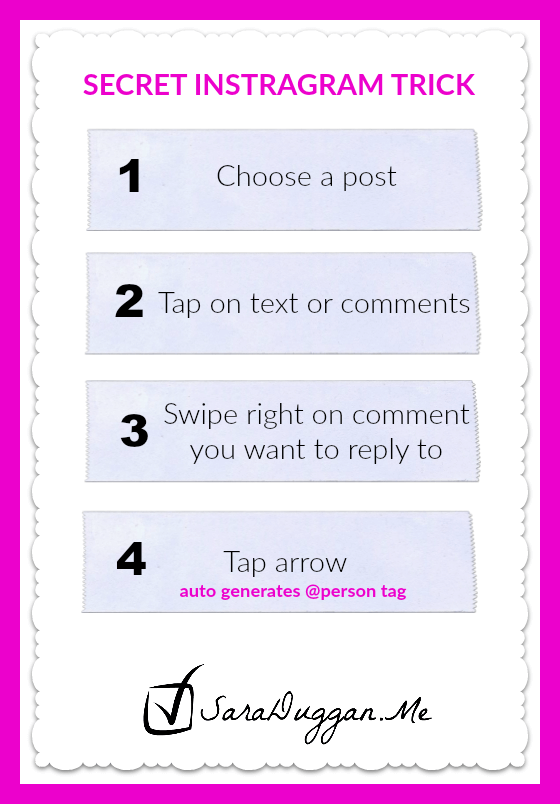
Step 1: Choose a post to comment on
You’re scrolling down your feed and find a great conversation. You want to comment to the original poster or maybe to someone who started a side conversation. You could comment and scroll up to find the username to mention them, remember the username, or wait for Instagram to guess the correct one OR…
Step 2: Tap on the comment (or tap the comment icon)
…simply tap (twice) on the comment. It should open up to allow you comment. Don’t comment just yet, though.
Step 3: Swipe right on the comment of the person you want to ‘talk’ to
Swipe right and a little box with a left arrow and a circle with “!” point shows up on the right side of your screen.
Step 4: Tap the left arrow…
and the username magically appears in the comment section. Mind blowing right? You can now make your comment, Thank You.
A Simple trick right? Do you know any other tricks that are mind blowing? Share them with me in the comments below or join me on Instagram:SaraAssistsYou
Thank you for stopping by and reading until the end. Here’s a social media posting schedule that I use as a guide. It includes topical ideas for Facebook and Twitter. If you want to have it customized for you reserve a time to talk with me on the phone.
Nicci Fletcher says
I’m just starting to use Instagram: in fact I created my account about 3 minutes ago! So I’m book marking this post because it’s going to be useful in the future. Thanks for the great tip!
Magical V.A. says
Nicci, Welcome to Instagram. I feel like such a newbie over there and I’ve been “playing” with it for a few years. I can get lost in the photos and stories people share so I have to set aside my ‘work time’ Instagram or else I’ll be wasting a lot of time.