
See How to Quickly Promote Post
Quickly promote post by having systems and tools in place before you hit publish. Here’s what I mean…
Last year I concentrated on driving traffic to this blog. I read posts on how to increase page views by thousands and 101+ ways to promote your post. I even created my own system of promotion, called the traffic map.
I spent a lot of time trying out different suggestions. I gave up on some as the return on investment was pretty low for me. I was getting traffic, but the type of traffic was useless as far as converting that traffic into subscribers or leads.
I want to use my time wisely. I have 24-hours each day and promoting my post into the abyss wasn’t the best use of my time.
The key takeaway from last years’ experiment is that no-cost blog promotion is very expensive when it comes to time.
What if you’re limited on time, can you still benefit from free traffic?
I asked my collaboration group at MyBlogU (read my review).
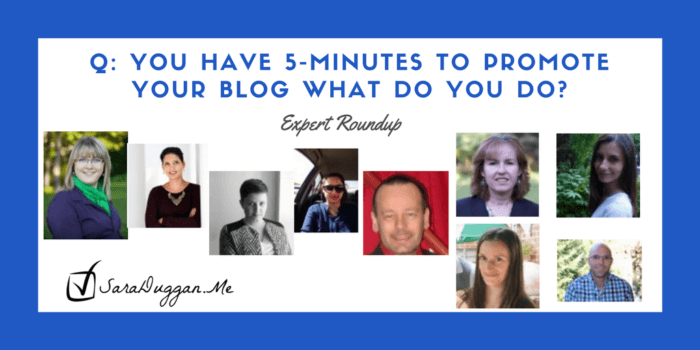
Q. What Do You Do To Promote Your Post In 5-Minutes?
You can quickly jump to each interview with the links below:
- David Leonhardt - Using Triberr, Viral Content Bee, Just Retweet
- Leticia Perez - Facebook and Mailing List
- Donna Duncan - Planning Ahead & 11-Step Execution [including blog partners]
- Fanny.Arles - RepostbyElokenz™, Mailing List, and Blogging Buddies
- Casey Miller - Quuu.co and Facebook [paid]
- Chad - Fetchit via Googlebot and Social Communities and Forums
- Minuca Elena - Email List, Large FB Groups, GooglePlus, and Pinterest Group Boards
- Kash Lalka - IFTTT, Tag Those Mentioned, and Pinterest
- Lylia Rose - Twitter, Instagram, TweetDeck, and Your SmartPhone
- Anita Kirkbride - Scheduling Multiple Posts (HootSuite) and Scheduling System (Preparation)
- Adithya Murali - Share Triggers, Hunter.io, and Contacting Influencers
You’ll Want to PIN This For Later:
Quickly Promote Post on Triberr, Viral Content Bee, and Just Retweet
A. David Leonhardt (President, THGM Writers)

While those are loading, I would send the URL out to a couple networking/mastermind groups on Skype for comment and sharing. These are people I know best and know me. We know each other’s content, so we know it’s worthwhile. I can always count on some people sharing it, which means I reach more people than promoting it on my own.
Then I would force an RSS feed update on Triberr so that my latest post is loaded into their system. This takes just a few seconds, but it usually takes a couple minutes for the post to show up on my profile.
While I wait for the post to show up on my Triberr profile, I would head over to ViralContentBee and JustRetweet to submit it there. These communities offer a mix of social media folks, who will retweet and share elsewhere, again expanding the reach of my content.
Finally, back at Triberr, I would refresh my profile so that the latest post shows up, and I would check if the post’s image is showing. It usually isn’t, so I would edit the listing and add the image URL to the CMS. The image makes a big difference to the number of shares a post will get, and hence the number of people who will be reached, so this step is worthwhile.
Then, with my five minutes expended, I’d grab a slice of pumpkin pie - just because!
Quickly Promote Post on Facebook
A. Leticia Perez (trucosviajeros) (Marketing Consultant and Travel Blogger)

Facebook Ads can be easily set up from your laptop or your phone (look for the Facebook Ads Manager App on Android and iOS) and can run on Facebook, Instagram, and some facebook partner sites too.
The best thing is that you are not only running a targeted ad to your ideal readers, but also publishing the content on your Facebook page, so your followers can see it and (if you have your Facebook and twitter accounts connected) it also publishes on Twitter. Plus, you can share it on your wall for all of your friends to see and re-share.
Another fast and efficient way to promote, would be sending a newsletter to my subscribers. This requires you to have a big subscriber list, so it won’t be as effective as the Facebook ads option in many cases. But if you do, it’s more rewarding than a regular Facebook Ad, as your subscribers are already engaged with your content.
Quickly Promote Post By Executing Your Advanced Plan
A. Donna Duncan (SEO / Content Marketing Consultant)

- I’d publish it on my website’s blog.
- I’d share it on my social media channels, including relevant hashtags where possible.
- I’d schedule periodic republications.
- I’d contact anyone who has contributed ideas or content to the post and provide them with a link. I’d thank them and ask that they share it with their network.
- I’d make sure I’ve cross-linked older content (where appropriate) to the new post.
- If the post contains original graphics, I’d share those on appropriate channels, ensuring they link back to the main blog post.
- I’d link to the post from relevant Q&A sites.
- I’d publish the post on approved syndication channels (with appropriate tagging).
- I’d add it to my next planned newsletter or client email distribution.
- I’d contact any blog partners I work with and ask them to share it as well.
- I’d make sure my RSS feed was working so I could be sure anyone looking to curate content and has included my blog as a source has a chance to see it.
That’s my list. Thanks!
Quickly Promote Post by Using Repost by Elokenz
A. fanny.arles (Co-founder of Elokenz)

The tool generates basic statuses (main blog post image + the article’s title or its first few words) but I usually add a few more when I have some time (like a question for my followers or a quote).
VIDEO TUTORIAL: How to Use Repost
By putting the article on Repost, I know it will be shared soon (depending on how I set up my social calendar) but I also know that it will take care of republishing it from time to time (the sharing frequency is based on user’s feedback and it will take care of picking a different status amongst those I set up).
Then, I usually send a newsletter to my subscribers: I have a ready-to-go newsletter on MailChimp that only takes me a few minutes to send. Also, if I have a bit more time, I contact a few blogger friends and bloggers featured in my article to let them know that I just published my new article.
Quickly Promote Post by Using Quuu.co
A. bestoffitness (Creator of thebestoffitness.com)

Next, I will repost my blog on Medium and Mode which are two blogging platforms. I have found that these two outlets generate some traffic and reposting is simple and quick.
If the post is long content such as a guide, I will use quuu.co to help promote the post and I can typically get 500 plus shares over a month. There is a fee associated with quuu.co but I have found it worth the cost as you can generate some traffic and backlinks.
Also, if I have the budget for content promotion, I will promote the post using Facebook to others in my niche and on my business page. This is a quick and easy way to reach other like-minded individuals and is usually cost effective.
When sharing my content I typically use my laptop as it is easier for me and takes less time. I will use my phone for some sharing and only use it when I am away from my laptop or on the road.
Casey Miller
Quickly Promote Post by Using Fetch It by Google Bot
A. Chad (Digital Content Strategist)
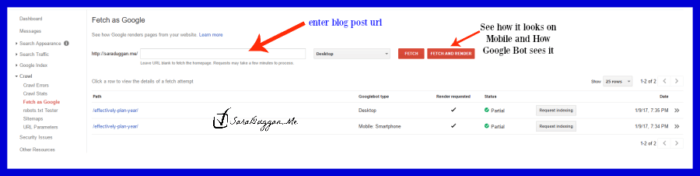
Screenshot of Fetch it for SaraDuggan.Me
The next 3-4 minutes are devoted to quick blog promotion. Since our blog falls under the digital marketing niche, we have curated a dedicated list of marketing social communities such as Reddit, Inbound, Growth hackers, Bizsugar etc, where we share our posts under relevant communities/tags within a few minutes of hitting the publish button.
Many bloggers do not realize how effective these top social communities can prove for their blogs in terms of traffic generation. Even if you are not blogging in the marketing niche, you can still get most of Reddit if not the other aforementioned channels.
Just make sure you find a relevant community (known as sub-reddit) and follow the rules, generally present on the right-hand side of the sub-reddit. Do not forget to make a list of popular social communities/forums that talk about your targeted industry.
Quickly Promote Post by Emailing it Your List
A. Minuca Elena (Minuca creates awesome influencer roundups that provide quality content, brings huge traffic, and helps bloggers connect with influencers.)

After that, I would quickly share it in a few large Facebook groups where I am popular. I would also pin it in some group boards. I get some good traffic from there using Pinterest marketing.
Also, I would share the post on Google plus as it helps with your search engine optimization efforts because G+ belongs to Google and they favor their social network.
I do all the work related to blogging on my laptop. I use the phone only for checking my email address and social media.
It is important to set your sharing plugin correctly so you will be tagged whenever is somebody tweets your articles. This way you can thank them later. Even a simple thank you can get you a new follower or even a link from a loyal reader that is just starting his blog and is happy that an influencer noticed him.
Quickly Promote Post by Using IFTTT
A. Kash Lalka (Co-founder of Best Expert Reviews)

If I had only 5 minutes per post, this is what I would do:
1. Use IFTTT to auto-schedule posts on Facebook, Twitter, Linkedin, and Pinterest. This way, every post of mine would be auto posted on social media and I get traffic
2. Use IFTTT to auto-schedule posts on WordPress, Tumblr, and Blogger. That way, I get traffic from those platforms and more importantly, three “dofollow” links which boost my SEO too.
The above is a one time set up and saves me a LOT of time. (Read how to set up IFTTT and Google Calendar)
For 5 minutes after every post I would do this:
1. Check which website or influencer I have mentioned and tag them on Facebook or Twitter. This builds a relationship and may even get you more traffic if they share it or retweet it.
2. Quickly make a few customized images on Canva for Pinterest which I can share on various relevant groups. This gets traffic, social signals and backlinks.
I don’t really have a preference on mobile or desktop. I am equally comfortable on both. If I am on my desktop when I finish my post, I share it via my desktop. If I am on my phone and a scheduled post gets live, then I promote it via my mobile.
Quickly Promote Post by Using Your SmartPhone
A. lyliarose (UK Lifestyle Blogger)

In less than five minutes I can share a new blog post to my Twitter account, Pinterest account, and Instagram. If I’m using my laptop I’ll also use Tweetdeck to schedule a few more tweets to share the blog post throughout the day or week.
On my phone I can quickly save the picture from the blog post to photos, if it’s not on my phone already. Using the picture alone in photos on an iPhone I can tweet, pin and Instagram directly from the photos app in around one minute or so without even leaving the photos app!
All I need to do is quickly copy the URL of the blog post, type my message to go alongside it and share away. The world of smartphones and social media makes sharing super quickly very, very easy.
Quickly Promote Post by Scheduling Multiple Posts

A. Anita Kirkbride (Social Media Strategist)

The one thing I would focus on is scheduling multiple posts on Twitter about the new blog article. Using a dashboard such as Hootsuite, it’s very easy and quick to schedule a tweet or two for each day of the week to promote the latest post. I would also be sure to include an eye-catching image with the tweets in order to draw the eye.
Repeating tweets might sound un-social to some people, but if done properly it can bring a lot more traffic to your blog. With the speed at which Twitter moves along, the chances of all your followers seeing the first and only post for your new blog article are slim. Especially if you’re not posting it at optimal times!
Scheduling repeating tweets for the blog will hit different people throughout the week, and maybe even new people who have followed you in the interim. It’s important to remember everyone uses Twitter at different times of the day, and not everyone will log in every day of the week, either.
To really do this well, it’s best if you can write a few different tweets to promote the post, rather than simply copying and pasting the same one over and over. Choose a quote, or pick each of the different sections of the post to focus on. Different tweets will attract different people, so variety is important.
And yes, if you have a scheduling system in place, your graphics already designed, you can schedule seven to 14 tweets in five minutes. It might take you a bit longer the first few times, but you’ll get the hang of it quickly and become more productive.
Quickly Promote Post by Including Share Triggers
A. Adithya Murali (Content Marketer)
This works in two ways:
- Adding quotes from well-known influencers get readers to trust you.
- They’re more inclined to share your post if it includes references or quotes from top influencers.
It doesn’t take a lot of time to quickly search for some famous quotes on the topic of your blog post and include them in your post. After the post is live, you can also reach out to those influencers and let them know about referencing them or their work in your article. This is a geat way to build relationships.
This is what I typically do:
I include a lot of influencers in one post or do a roundup post with a lot of them
I then quickly collect their contact emails with Hunter.io and then just send them a quick email notifying them about the post, and about how I admire their work ( a little ego boost goes a long way).
And here’s a great example of how effective this simple strategy is- just by reaching out to all the podcasters mentioned in my free marketing podcasts list, I got some big names like Joe Pulizzi and John Lee Dumas to share it. Now the post has well over 1000 shares on social!
And, if that wasn’t enough for you, I found this post on Twitter yesterday:
32 Easy Ways to Promote Your Blog Post in 5-Minutes by Hailey Dale of TrunkedCreative
Learn 32 brilliant ways to promote your latest blog post in 5 minutes! https://t.co/odZr65KBdm #bossbabes #cmm #savvybusinessowner pic.twitter.com/w6k0fyt9DJ
— Hailey Dale (@TrunkedCreative) January 10, 2017
It’s a massive post with explainations on why you should do each task. She includes what to share on social, your website, through networking and outreach, bookmarking and blog platforms, and even the often missed one, add it to your email signature.
Basically, much of what is recommended by the experts in this post PLUS some. Be sure to read her post, say Hi for me, and download that awesome blossom Checklist she made for you.
How Would You Promote Your Post If You Only Had 5-Minutes? Do share in the comments below.
P.S. If you need help promoting your blog post, I can help. Let’s explore options in a 15-minute strategy call. No cost, No fuss. Just straight talk that will help you be more productive.
Minuca Elena says
Hi Sara,
Great post! Thanks for including me!
I saw that David recommended Viral Content Bee. I recently discovered it and I love it. He also mentioned Just Retweet. I tried it but I haven’t received any retweets although I gave about 40-50 credits per share. Do you have any experience with this site?
Kash, I also tried IFTTT and it felt very complicated to use. Maybe I will give it another try. You seem to get great results using it.
Cheers,
Minuca
Sara Duggan says
Minuca, Viral Content Bee is one of my favorite sites for retweets and shares. Yes, I do use Just Retweet too. That one does need a little more learning time. I should write a post on it. IFTTT is a bit overwhelming at first, but so very helpful in the end.
Victoria Sully (Lylia Rose) says
So many great ideas here and some new ones I must check out. It’s great to have time saving ideas as everyone seems limited on time nowadays!
Sara Duggan says
Victoria, thank you for adding to the ideas in this post. I couldn’t have done it without you. ^_^
Kia B. says
Great composition Sara. There are many ideas that are just fabulous.
Keep sharing the great stuff.
Sara Duggan says
Thank you, Kia. So lovely to have you and I appreciate the kind words.
Shelly Campbell says
Thank you, Sara, this post was loaded with value! I will be referring to it often.
Sara Duggan says
Sure thing. I have plenty of help putting this together. Thanks for stopping by and taking the time to comment Shelly. ^_^