Use PLR content to make your live videos fun and easy.
Let’s face it, live video is here to stay.
I see you screaming and running away but…

Hear me out.
I’m an introvert.
I’m also very conscious of my imperfections. Probably more so than anyone can point out. I know me 90%. The other 10%, I’m still working on. ^_^
BUT, this is me.
You don’t have to accept it.
You can leave whenever you want.
You don’t have to read this.
You don’t have to listen or watch when I do video or audio.
It’s your choice, right?
BUT, what if I never wrote anything? What if I never shared the imperfect me on video or on audio?
You wouldn’t be reading this, would you?
I’d still be unknown to you.
As though I didn’t exist.
That’d be very sad, right?
I hope you agree.
I (and YOU) exist to love others.
To help others.
To serve others.
To bring joy to others.
So, why do we hide?
What keeps us from exclaiming, like a two-year-old,

Hey, look at me. I have something that will make your day.
How to Use PLR Content in Live Video
Live Video and its place in the market, is something businesses can’t ignore.
No, you don’t have to participate.
But, your business’ marketing may suffer.
Hey, you don’t even have to get in front of a camera.
You can hire someone to do it for you or you can record in the third person.
How?
Meet Tabitha Lavender.
My new assistant.
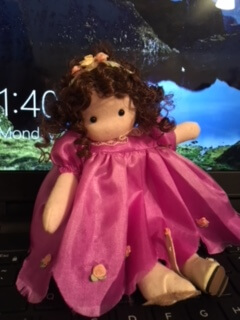
Now, I can’t hide behind Tabitha forever. But, she helps me not take myself too seriously.
Using this third party character helps me express myself in ways I’d be too scared to do. Whatever works, right?
Today, I’d like to share more about PLR Content. More specifically, how you can use it to spark ideas for Facebook Live Videos.
Here are some ideas to get you started:
- Q and A’s
- AMA (CEO)
- Demonstrations (products)
- Live How-Tos (ex. how to wash your new {insert your product name})
- Live Cooking (Chalene Johnson does this with live cooking demonstrations)
- Live Crafting (how about a crochet-a-long or a virtual quilting party?)
- Live Coloring (just saw someone today share a live coloring event (recommending markers to buy))
- Interviews - people of interest to your audience
- Events - capture yourself at an event (hey, here’s how to use Live Video without being on the camera yourself)
- News (as it is happening)
- Challenges (Angela Wills* is really good this)
- Behind the scenes (here’s a look at what goes on in my working world)
- Roundups and industry news (think of capturing your blog post roundups as live videos)
- Product review - these are popular on YouTube, why not on FB Live?
More Topic Ideas:
- 65 More Topics - for Periscope but still, live video
- Creative Topics for Authors
- TubularInsights - Whitepaper on FB LIVE
- Ideas for a Personal Chef
So many ideas, right?
What are some of your ideas? Scroll down and share one or two in the comments. ^_^
Use PLR Content for Live Video Topics
Well, just like PLR done-for-you Content is great for sparking new ideas for your blog posts, your video marketing, and your podcasts, it’s also a valuable resource for Facebook Live as well.
Before you start to use PLR content for your live videos, here are some suggested tips:
- Be Consistent - choose a day and time and show up
- Stay on Topic - have a plan and stick to it
- Practice - people don’t naturally like to put themselves out on display, so the more you practice, the easier it gets (or at least you’ll become more comfortable pushing that record button)
Wanda Baader of Strategize Your Success (Plr for Business) suggests you give something away.

Wanda also suggests you wait until the end to encourage people to watch the full broadcast. PLR content is a perfect solution for these broadcast listeners only gifts.
This got me thinking about how you can grow your email list* (and community) using Facebook Live.
Draw people in with the freebie, don’t let them work for it, so no opt-ins, okay.
BUT, this doesn’t mean you can’t use a few links in your freebie, right?
Use affiliate links and encourage people to sign up to your email list for FB live notifications.
Get people in the habit of expecting a freebie (content) at the end of your broadcasts.
It builds trust, you educate your audience, and you even “ask for the sale” within your content freebie.
All the while, building and nurturing your online community. I’d say that is a win-win, don’t you agree?
What happens when things go wrong?
Yes, things will go wrong. Plan for them but don’t panic or toss in your live video skills just because of a mistake or glitch.
If you’re knocked off live, simply get back on and let your viewers know. But, before you even broadcast, make sure your connection is strong. Eliminate as much of the possible problems beforehand.
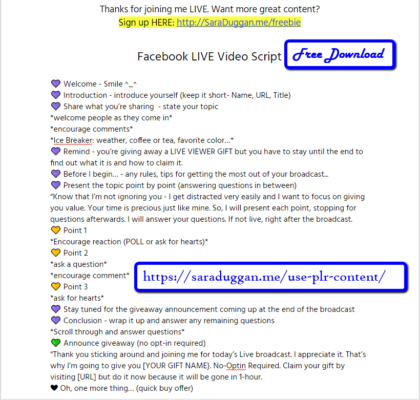
So, how about practicing? Here’s a script I worked up this morning. I’m about to go LIVE to show you how this all works. Be back in a bit. ^_^
Facebook Live: How to Use PLR on Live Videos [a live example]
Free Live Broadcast Script
Dear Readers,
Did you like this post? What stuck out to you the most? Leave a comment below and share with a friend. ^_^
This month I’m writing along with #Write31Days and #BlogBoost Ultimate Blog Challenge. You can view all my posts and learn how you can contribute to the eBook of this How to Use PLR Content Series. I’d love to include your input.
P.S. Are you getting excited about all the possibilities with PLR Content? My friend Kelly McCausey, I interned with her back in 2010, is training a select few people how to teach PLR Content. She’s a successful business coach and teacher. She’ll train you how to teach your PLR (this session is all about Email Lists) Content BUT she’s recording it too. At the end of your 4-week session, she’ll wrap it up and you can TEACH it to your community. It’s kind of like a “business in a box”. Learn More*.


p.s.s. I almost forgot, register for Kelly’s Train then Teach coaching/PLR and get an early bird $200 discount. ^_^ http://saralikes.com/trainthenteach